
A spam complaint is the single most damaging signal a recipient can send about your email. It is worth more to a mailbox provider than an unsubscribe, a delete or a bounce, and it is the one metric that can take a sending domain from the inbox to the junk folder inside a single campaign. This guide explains what a complaint is, where it goes, what rate is dangerous, how to read the Spam Complaints Report inside Publicators, and exactly what to do on the day complaints spike.
What a spam complaint actually is
Three things that look similar to a marketer are completely different to a mailbox provider.
A delete without reading is a weak negative signal. The recipient saw the sender name or the subject line and decided it was not worth opening. Gmail and Outlook notice it, but a single delete carries almost no weight.
An unsubscribe is a neutral signal, and in some ways a positive one. The recipient used the mechanism you gave them. Nothing is reported to the mailbox provider, nothing touches your sender reputation, and the address leaves your list cleanly. An unsubscribe is the outcome you want from a recipient who has lost interest.
A spam complaint is a recipient pressing “Report spam” or “Mark as junk” in their mail client. That is not a message to you. It is a message to Gmail, Yahoo or Microsoft saying that mail from your domain is unwanted, and the provider records it against your sending reputation. It is the only one of the three that is reported back to the provider as evidence against you.
The practical consequence is blunt: a recipient who unsubscribes costs you one address. A recipient who complains costs you deliverability to every other address at that provider.
Where the complaint goes: feedback loops
A feedback loop, usually abbreviated FBL, is an arrangement in which a mailbox provider forwards complaints back to the sender so the sender can remove the complainant. Reports arrive in the Abuse Reporting Format defined by RFC 5965, and the provider normally redacts the recipient’s address before sending them.
Which providers run one, and what you actually get back, differs more than most guides admit:
- Yahoo runs a Complaint Feedback Loop that identifies the complaining address, so a sender can suppress it directly. Yahoo’s loop also covers AOL, which Yahoo now operates.
- Microsoft runs the Junk Mail Reporting Program (JMRP) for Outlook.com, Hotmail and Live, alongside Smart Network Data Services (SNDS), which reports complaint rates per sending IP address.
- Gmail is the important exception, and almost every article gets this wrong. Gmail does not operate a per-recipient feedback loop. Its FBL is identifier-based: you embed a
Feedback-IDheader, and Gmail reports an aggregated complaint rate for that identifier only once it crosses a volume threshold. Postmaster Tools shows you a daily spam rate as a percentage. Gmail will never tell you who complained.
That asymmetry is why a Spam Complaints Report can look reassuringly short while Gmail deliverability is already deteriorating: Yahoo and Microsoft name names, and Gmail — usually the largest slice of an Israeli or international list — reports only a number. Reading the report is necessary, and it is not sufficient. Check Google Postmaster Tools alongside it.
Why mailbox providers weight complaints so heavily
A mailbox provider has to decide, in milliseconds and at enormous scale, whether a message belongs in the inbox. Almost every signal available to it is ambiguous. An open may mean interest or may mean an image proxy prefetched the pixel. A delete may mean rejection or a tidy inbox. A bounce may mean a dead address or a full mailbox.
A spam complaint is the one signal with no ambiguity in it. A human being was shown the message and explicitly classified it as abuse. It cannot be faked by a bot, it cannot be inflated by a prefetch, and it needs no interpretation. That is why providers treat it as the highest-confidence input they have, and why a complaint rate moves a sender reputation faster than any engagement metric.
Complaints are also evaluated per sending domain and per sending IP, not per campaign. A single bad send contaminates the reputation that every subsequent campaign depends on, including transactional mail sent from the same domain.
What complaint rate is dangerous — the actual numbers
Complaint rate is complaints divided by messages delivered, not messages sent. Two figures matter, and they belong to specific companies rather than to industry folklore.
- Google: 0.3% is the enforcement line, 0.1% is the target. Google’s bulk sender requirements, in force since February 2024 for anyone sending more than 5,000 messages a day to Gmail addresses, state that senders must keep the spam rate reported in Postmaster Tools below 0.3%, and explicitly recommend staying below 0.1%. Above 0.3% Google states that mail may be rejected or delivered to the spam folder.
- Yahoo announced matching requirements on the same timetable, also effective February 2024, with the same 0.3% ceiling.
- Microsoft introduced equivalent authentication requirements for high-volume senders to Outlook.com in 2025, and publishes complaint rates per IP through SNDS.
To put 0.1% in terms you can act on: one complaint per thousand delivered messages. On a 50,000-recipient send that is 50 complaints. On a 5,000-recipient send it is five. At small list sizes the threshold is brutally sensitive — a handful of complaints on a small segment will breach a rate that the same number of complaints on a large send would not.
That sensitivity is the reason to watch the trend and not only the day’s figure. A single campaign at 0.25% is a warning, not a crisis. Three campaigns in a row climbing from 0.05% to 0.25% is a crisis, even though no individual send breached anything.
The other requirements that arrived with those 2024 rules are worth stating because they are what complaint-driven filtering is applied on top of: authenticate with SPF and DKIM, publish a DMARC record, use a one-click unsubscribe header as defined in RFC 8058, and honour unsubscribe requests within two days.
How to read the Spam Complaints Report in Publicators
Publicators records every complaint it receives through the feedback loops it is subscribed to, attaches it to the campaign that triggered it, and exposes it in your account so you can act on it the same day. Finding it:
- In the upper bar, open the Reports tab.
- In the drop-down menu, select Campaign Reports.
- In the window that opens, on the orange navigation bar, click Removals.
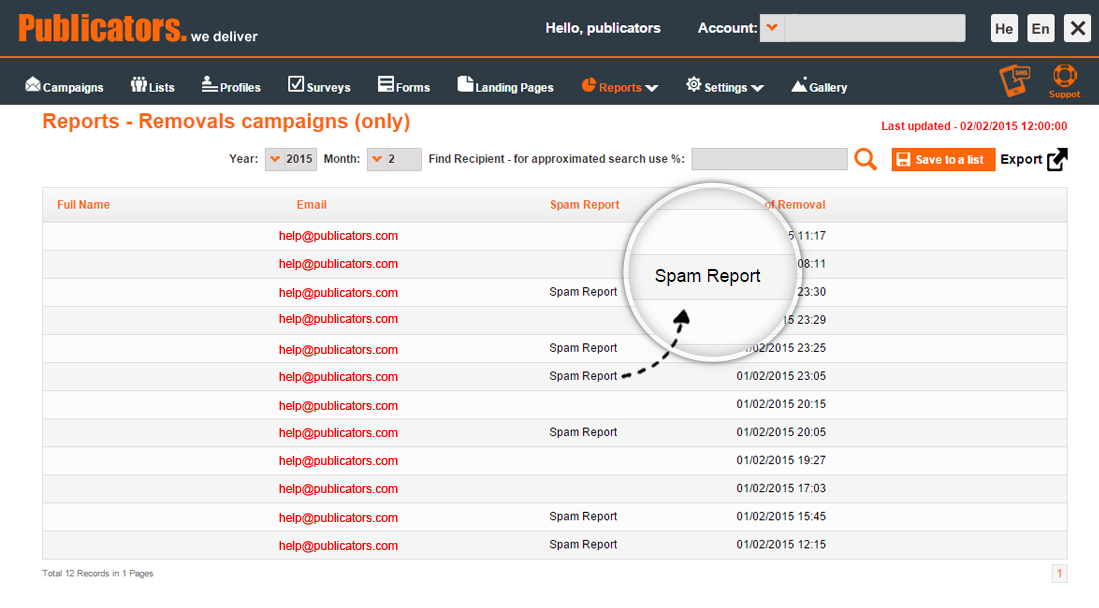
The screen is headed Reports — Removals campaigns (only), and it lists one row per address that left your lists, scoped to a single period by the Year and Month filters at the top. Four columns matter. Full Name and Email identify the recipient, Date of Removal timestamps it, and the column that turns this from a list of departures into a deliverability tool is Spam Report. That flag appears only on rows where the address left because the recipient filed a complaint — as opposed to unsubscribing, bouncing permanently, or being removed by you.
Three things follow from that one flag, and together they are the reason to read this report rather than a headline percentage:
- It separates complaints from ordinary churn. A month with 200 removals and four Spam Report flags is a healthy list behaving normally. A month with 40 removals of which 30 are flagged is a serious problem, even though the total is five times smaller. A single removals count tells you neither.
- It is scoped by month, so check the period before drawing any conclusion. An empty report far more often means the wrong month is selected than that nobody complained.
- It comes out of the system. Save to a list turns the rows into a list you can keep and work with, and Export takes them out of the platform entirely — which is what you want when the suppression has to survive in a CRM or a second sending system as well. The search box above the table finds one specific recipient, which is what you need when somebody contacts you about a message they say they never signed up for.
Underneath all of that, the report answers a question no aggregate percentage can: which specific addresses complained, and on which campaign. That gives you two things. The obvious one is a suppression list — those addresses must never receive another message from you, and Publicators removes them so that they do not. The second is diagnostic: if the flagged rows cluster on one segment, one import or one subject line, you have found your cause without guessing.
Publicators is committed to an anti-spam policy and works continuously to maintain an international sender reputation across shared infrastructure. Because that reputation is shared, your awareness of complaint impact is not only your own concern — it protects every other sender on the platform too. That is also why the removal is automatic rather than advisory.
For the wider reporting picture — opens, clicks, bounces and engagement over time — see Publicators reporting. Complaint data is most useful read next to engagement data, not alone.
What to do the day complaints spike
This is a procedure, not a checklist to browse. Work through it in order — the early steps stop the damage, and the later ones diagnose it.
- Pause every scheduled and recurring campaign — Before diagnosing anything, stop sending. Every additional message delivered while the complaint rate is elevated adds to the rate and deepens the reputation damage. Pause scheduled campaigns and any automation or customer journey that sends on a trigger, including abandoned-cart and win-back flows.
- Open the Spam Complaints Report and confirm the removals — Go to Reports, Campaign Reports, Removals in Publicators and read the complaints attached to the campaigns that went out in the last 72 hours. Confirm that every complaining address has been suppressed. An address that complains once and receives another message is the fastest route to a block.
- Calculate the real complaint rate per campaign — Divide complaints by messages delivered for each individual campaign, not for the account as a whole. An account-level average hides a single catastrophic send inside a month of healthy ones, and the send that caused the problem is the one you need to identify.
- Identify the source of the addresses that complained — Trace the complaining addresses back to how they entered the list: which import, which signup form, which event, which date. Complaints cluster by origin far more often than they cluster by content. A list bought, scraped, inherited from an acquisition, or collected without explicit consent will produce complaints no subject line can fix.
- Check when those recipients last heard from you — A long silence followed by a sudden campaign is one of the most reliable causes of a complaint spike. Recipients who consented eighteen months ago and have received nothing since do not remember you, and “I do not recognise this sender” is functionally the same decision as “this is spam.”
- Verify SPF, DKIM and DMARC are intact and aligned — Confirm that the sending domain still authenticates correctly and that DMARC alignment has not broken through a DNS change, a domain renewal or a new subdomain. Authentication failures do not create complaints by themselves, but they remove the margin a sender has when complaints rise, and they are checked first by every provider.
- Suppress the unengaged cohort before sending again — Build a segment of everyone who has not opened or clicked in a period you define — six months is a reasonable starting point — and exclude it from sending until the rate recovers. This is the single fastest lever on complaint rate, because unengaged recipients generate complaints at several times the rate of engaged ones.
- Resume at reduced volume and increase it in stages — Restart with your most engaged segment only, at a fraction of normal volume, and increase over one to two weeks while watching the rate after each send. Returning immediately to full volume, even with a clean list, re-triggers the filtering you are trying to escape.
- Monitor Postmaster Tools and SNDS daily until the rate is stable — Google Postmaster Tools reports Gmail spam rate and domain reputation; Microsoft SNDS reports complaint rate per IP. Watch both every day, because the report inside any sending platform can only show the complaints its feedback loops receive, and Gmail’s are aggregate rather than per-recipient.
How to bring a damaged sender reputation back
Sender reputation recovers, but not on the timescale most people expect, and not in response to everything.
Expect weeks, not days. Mailbox providers evaluate a sender on a rolling window of recent behaviour. A domain that spent a month producing complaints needs a comparable period of clean sending before the trend outweighs the damage. A week of good behaviour after a bad campaign will usually move the reputation graph a little; it will rarely restore inbox placement on its own.
What actually moves it: a sustained fall in complaint rate, a sustained fall in hard bounces, and a rise in positive engagement — opens, clicks, and especially recipients moving a message out of spam back into the inbox. Consistent sending volume also matters: providers read erratic volume as a risk signal in itself.
What does not move it: changing the from-name while keeping the same domain, rewriting subject lines, adding more images, or asking recipients to whitelist you in a message they are not receiving. Nor does moving to a new sending domain — that discards the reputation you are trying to repair, starts you at zero with no history, and is treated with suspicion by filters precisely because it is what a spammer does after being blocked.
The one thing that reliably fails: continuing to send to the same list at the same volume while waiting for the numbers to improve.
Three ways to avoid complaints in the first place
The first rule about spam complaints is to make an effort not to receive them.
- Make the unsubscribe link clearly visible and confirm it works. A recipient who cannot find an unsubscribe link in a few seconds will press “Report spam” instead, because that button is always easy to find. Burying it, shrinking it, or requiring a login converts unsubscribes — which cost you nothing — into complaints, which cost you everything. A one-click unsubscribe header is now a requirement for bulk senders, not a courtesy.
- Never add an address whose owner did not agree to receive your mail. This covers purchased lists, scraped addresses, business cards collected at a conference, and contacts inherited with an acquisition. In Israel this is also a legal question: Amendment 40 to the Communications (Telecommunications and Broadcasting) Law, in force since December 2008, requires prior consent for commercial messages and allows statutory damages of up to ILS 1,000 per message without the recipient having to prove any loss.
- Run periodic win-back campaigns to inactive addresses. Every six months, send a “we miss you” message to recipients who have not opened anything in that period. Those who still do not engage should be removed. Some of them are spam traps — recycled addresses that mailbox providers use specifically to catch senders mailing stale lists — and the rest are people who will eventually complain. Removing them costs you nothing you were getting value from. See how newsletters and segments are built in Publicators.
The silver lining
There is a genuine upside to a spam complaint. Whether it came from a troll or from someone who simply lost interest, that person has told you unambiguously to remove them. Unengaged recipients were already lowering your engagement rates and your sender reputation by never opening; the complaint just made the problem visible and forced the removal you should have made anyway.
And if the complainant is not a troll, you may have received useful feedback. A complaint spike that follows a change in frequency, design or content is telling you something about that change. It is worth examining the newsletters that produced it before concluding the list was at fault.
Frequently asked questions about deliverability
How do you make sure emails reach the inbox and not spam?
Inbox placement rests on three layers that have to hold at the same time. The first is authentication: SPF, DKIM and DMARC records published correctly on the sending domain, with DMARC alignment intact, so that providers can verify the send is authorised. The second is infrastructure reputation — the sending IPs and domain must have a history of low complaints and low hard bounces, which is why Publicators monitors reputation across its sending infrastructure and handles failing addresses automatically. The third is the list itself, and it is the layer most senders neglect: consent at the point of collection, immediate removal of opt-outs and complainants, and active suppression of recipients who have stopped engaging. Complaints are where the third layer fails visibly, which is why the Spam Complaints Report is a deliverability tool rather than a reporting curiosity. Publicators guides domain setup and the first deliverability checks during onboarding.
What is list hygiene?
List hygiene is the continuous removal of addresses that are invalid, unreachable or unengaged, so that what remains is an audience that actually receives and reads your messages. In the context of spam complaints it does something more specific than saving money on contacts: it removes the population that generates complaints. Recipients who have not opened anything for a year are, as a group, far more likely to report a message as spam than recipients who opened last week, and they are also where recycled spam traps accumulate. Hygiene is therefore not housekeeping you do when there is time — it is the mechanism that keeps the complaint rate below the thresholds providers enforce.
What happens to invalid addresses?
Publicators separates permanent failures from temporary ones. A permanent failure — a mailbox that does not exist, a domain that does not resolve — is flagged and excluded from all future sends automatically, because repeatedly mailing addresses that do not exist is one of the clearest signals to a provider that a sender is not maintaining its list. A temporary failure, such as a full mailbox or a server refusing traffic for a period, is logged and retried on later sends, and an address that keeps failing is flagged in the same way. This matters to complaint rate arithmetically as well as reputationally: complaint rate is measured against messages delivered, so a list carrying dead weight both damages reputation and distorts the figure you are trying to read.
What should you do with contacts who have not opened in a long time?
Identify them first as an explicit inactivity segment, using a window you choose deliberately — six months is a common starting point, though a quarterly newsletter needs a longer one than a daily deal. Then send that segment a win-back message that is visibly different from your usual campaign: an offer, a short survey, or a request to update preferences. Anyone who engages returns to the active list. Anyone who does not should move to a much lower frequency or off the list entirely. The reason to do this before a complaint spike rather than after is that a long-silent recipient does not remember consenting, and a campaign arriving after eighteen months of silence is indistinguishable to them from mail they never asked for.
Can addresses be validated before sending?
Yes, and the earlier in the chain it happens the more it is worth. At import, Publicators detects malformed email addresses and phone numbers, duplicates and empty records, and reports them before they enter the database. On website signup forms, validation at the point of entry catches typing errors at source, which is the most effective option available — an address mistyped into a form is never going to become valid later, and it will bounce on every send until something removes it. Validation cannot tell you whether the owner of a valid address consented, though, and consent is what determines complaints. Validation protects the bounce rate; consent protects the complaint rate.
Why does list quality affect deliverability?
Because mailbox providers do not rate your content — they rate how recipients respond to you. Every provider maintains a running judgement of your domain and sending IPs built from complaints, hard bounces, spam-trap hits, deletes without reading, and positive actions like opens, replies and rescues from the spam folder. A list with a high proportion of invalid or unengaged addresses drags every one of those inputs in the wrong direction at once. The consequence is not confined to the bad portion of the list: once the provider’s rating falls, messages to your most engaged, most valuable recipients start landing in spam as well. Cleaning a list is therefore a condition of the channel working at all, not a cost-saving exercise. Further deliverability questions are answered in the Publicators FAQ.